
Claude Skills brings efficiency to your prompting. You can ensure brand consistency by defining style guidelines or minimize time spent creating slide decks by enabling the new Theme Factory skill.
🎥 Watch the announcement video here.
I didn’t hear about Claude Skills until I saw some chats discussing it on Substack. Specifically, the Nate B Jones’ Substack chat room started blowing up. (Nate is a great technical resource btw, even if you don’t pay the $8 fee).
So what do Claude Agent Skills enable you to do as a Marketer?
Anthropic says “Claude can now use Skills to improve how it performs specific tasks. Skills are folders that include instructions, scripts, and resources that Claude can load when needed.”.
The first question I had is: “How does this differ to setting up a Claude project?”. The short answer is that Skills trigger contextually, Projects are manual. Skills apply everywhere, not just within a project so they’re more versatile.
The intent is to improve efficiency and reduce token use. I’ve got a section below on tokens so as not to get too technical right away.
Where is the value in Claude Skills for Marketers?
As a solo marketer you can gain efficiency and time by using Skills. The feature really shines when Skills are used at scale with a team/s or organization. Either way, jump in and activate Skills, toggle a few on and test them in chat to quickly see how they can work for you individually.
I’ve listed a few use cases where marketers can apply Claude Skills.
- Content repurposing Let’s say you regularly turn blog posts into LinkedIn content. Right now, you probably:
- Copy-paste your blog into Claude
- Explain: “Turn this into 3 LinkedIn posts, conversational tone, lead with a hook, include relevant hashtags”
- Revise because it’s too formal or doesn’t match your voice
- Repeat this entire process next week with a different blog
- With a Content Repurposing Skill, you’d:
- Create the skill once with your format: “3 posts, conversational, start with a question or contrarian take, 150-200 words each, use 3-5 hashtags max, avoid corporate jargon”
- Include 2-3 examples of your best-performing posts as reference
- From then on, just drop in your blog URL and say: “Repurpose this for LinkedIn”
- What you’d put in the skill:
- Your tone guidelines (“Write like you’re explaining to a colleague over coffee, not presenting to a board”)
- Your LinkedIn post structure (hook > insight > takeaway > CTA)
- Examples of posts that performed well
- Hashtag strategy
- Length preferences
- Time saved: Instead of 15 minutes of prompting and revising per blog, it’s now a 2-minute ask. With a setup time of 5-15 minutes, you’re already making some great time savings.
Some other examples include:
- Campaign templates: Create skills for campaign briefs that follow your team’s format
- Reporting automation: Skills that format performance data into your standard report template
- Competitive analysis: Skills that structure market research using your framework
Where you can find and activate Claude Skills?
Go to Settings > Capabilities > Scroll down to Skills. You will also need to enable “Code execution and file creation” before you can activate any skills. This permission allows skills to generate files and automate tasks. You’ll need it enabled for most reporting and automation skills.
How easy is it to install and use Claude Skills?
Here’s the thing: if your administrator hasn’t activated Skills, you’re stuck. My first attempts to install new skills were unsuccessful because Skills were not toggled. I was presented with an unhelpful message: “Not found” many times over. You wouldn’t know that when you attempt to upload new skills because, frustratingly, Claude doesn’t warn you or give you any clues that Skills aren’t activated. Start with checking with your admin. My understanding is that if Skills are available, you’ll see some “baked in” options made available by Anthropic, as shown here:
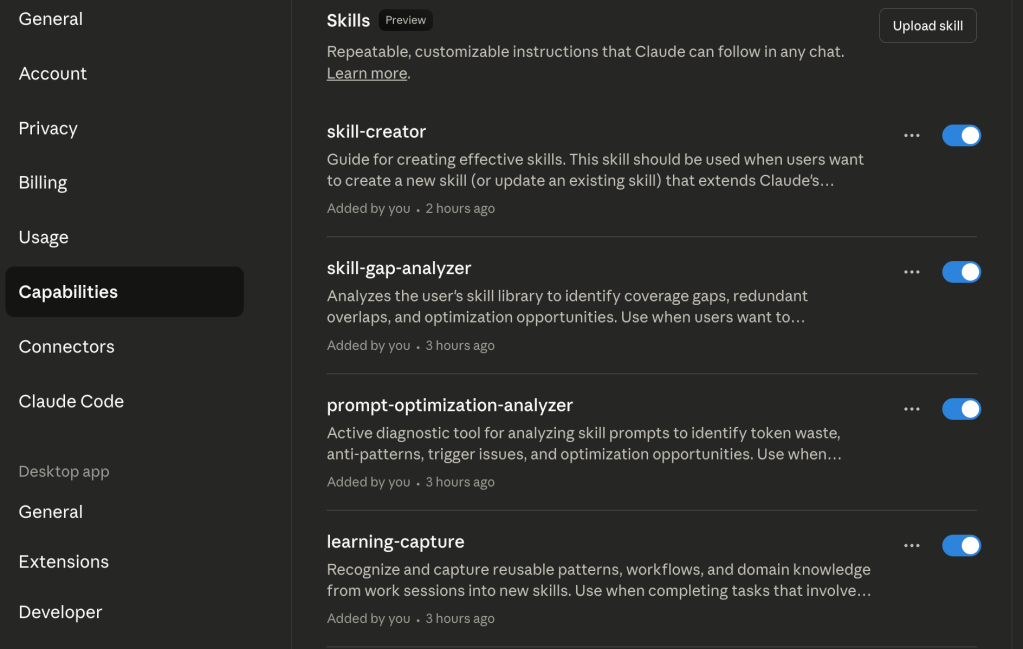
One final caveat that you might find causes quite a headache is that each user in your team will each need to install the individual Claude Skills one-at-a-time. Based on my reading, Skills cannot yet be deployed at a team or organization level.
Where can you download Claude Skills?
- Awesome Claude Skills
https://github.com/travisvn/awesome-claude-skills - Anthropic’s Github Repository
https://github.com/anthropics/skills
How easy is it to build your own Custom Claude Skill?
Once you’ve activated Skills you can immediately leverage skills to create new skills. First up, download and install the Skill Creator Skill in Claude.
Once activated, creating a Skill is surprisingly straightforward. Just start a conversation with Claude like:
“Help me create a skill for formatting our weekly marketing performance reports”
Claude will guide you through the process by asking questions about:
- What the skill should do
- When it should activate
- What format or structure you want
- Any templates or examples you have
If you need to create entirely new Skills, read Claude’s Support for Custom Skills and expect to spend 30 minutes to a few hours depending on what you’re building and your comfort level.
Should you act on Claude Skills now?
As a solo marketer, you should adopt Claude Skills, particularly if you see immediate value and can reduce repetitive work. If you’re a generalist doing everything, you’ll benefit. As a marketing leader with a large department, I would recommend you wait until the product matures and Skills can be deployed at scale. If you’re leading a small team and can delegate Skills as a small project to roll out, I’d consider this a low priority as these capabilities will likely expand and improve within 3 months.
What are tokens?
There’s a great subreddit topic on this here, but in short: Tokens are how AI models process text. You can think of them as chunks of words that cost money to process. Why does token efficiency matter? Put simply, the benefit is time savings you’ll gain when you don’t have to repeat the same instructions. If you’re running into rate limits, you’ll very much appreciate saving some of those precious tokens.

 this is jordan payne
Leave a comment